A hosted Suggestions portal
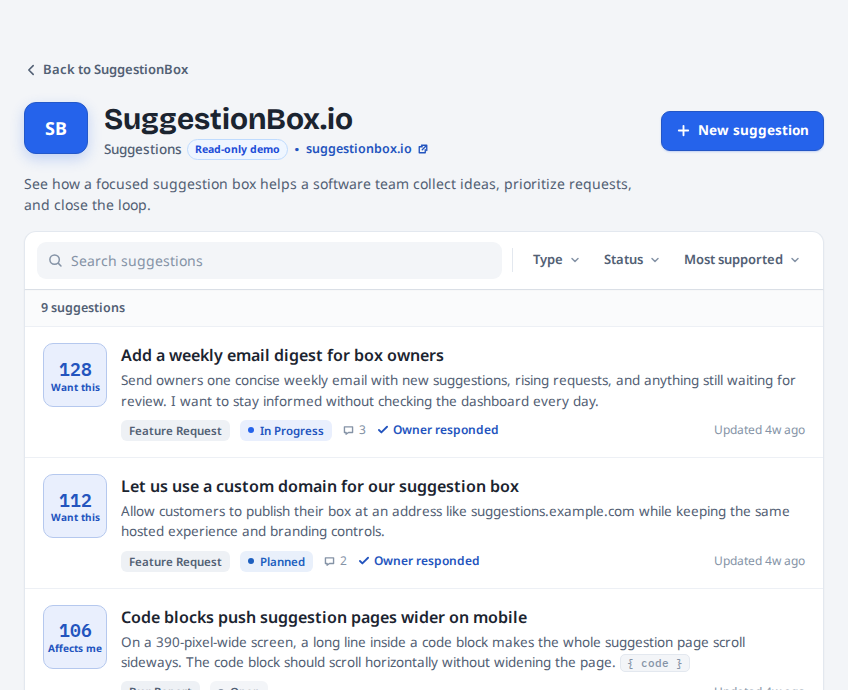
Give customers a public place to submit, search, participate, and see your response.
Suggestion box software
Give customers a branded Suggestions portal. Review every submission in one area and decide what becomes public.
The problem
Customers need an obvious place to submit and discuss Suggestions. You need one place to review them, respond, and decide what belongs on the public board.
One SuggestionBox. One clear workflow.
Give customers a public place to submit, search, participate, and see your response.
Every submission becomes a Suggestion in the same place.
Statuses, official responses, and follower updates keep customers informed.
One workflow, clear visibility
Every source sends submissions into the same Suggestions area. Source and moderation state stay visible while you decide what becomes public.
Customers submit, search, express interest, comment, follow, and see your official response.
Let visitors submit from your website. Every Widget submission waits for review.
Review every submission, publish what belongs on the board, and respond from one place.
The workflow
Customers use the hosted portal or Website Widget. You review every submission in Suggestions, publish the ones worth discussing, and post updates where customers can find them.
Customers share a Suggestion through your portal or Website Widget.
Moderate every submission in the same Suggestions area.
Publish a status or official response and keep followers updated.
Pending Suggestions remain private until approved. Verified portal submissions follow the moderation setting you choose.
An honest boundary
Each paid SuggestionBox gives one product or brand its own Suggestions area, public portal, settings, and billing. One login can manage several independent SuggestionBoxes.
The whole product
It gives customers a dedicated place to submit and participate in Suggestions, plus one owner area for review and response.
No. Pending Suggestions remain out of public view until you deliberately approve and publish them.
Every Website Widget submission enters Suggestions as Pending review. It does not publish directly to the customer portal.
No. Customers browse freely and verify by email only when they submit, express interest, or comment.
Yes. One login can manage multiple independently branded and separately billed SuggestionBoxes, with one for each product or brand.
Founder Plan
The Founder Plan does not become more expensive when more customers participate. No participant or submission fees.
Create it, add your brand, and start with one link. No setup call. No sales call. No waiting.
Create your suggestion box