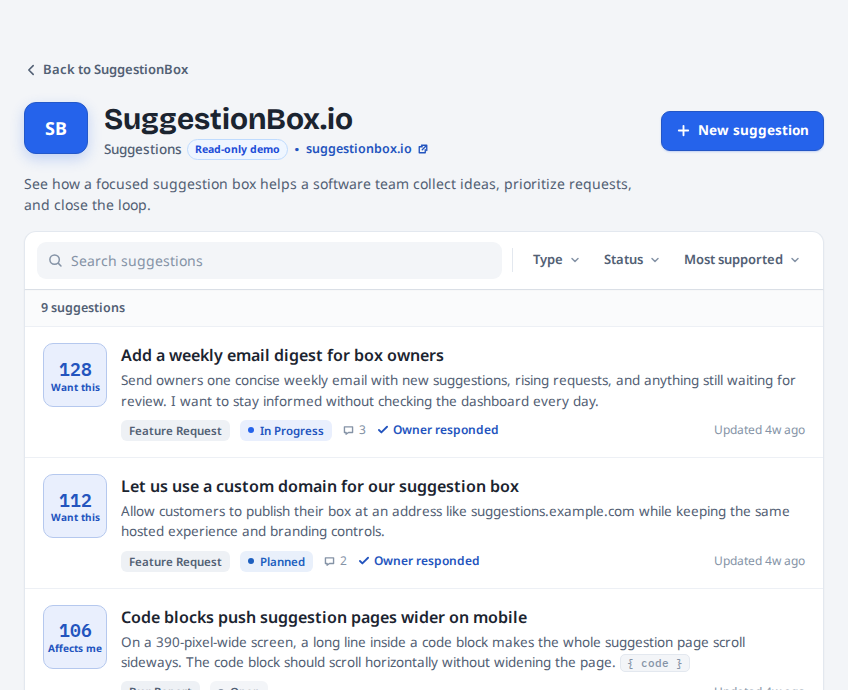
Keep your contact form. Give Suggestions their own place.
Keep your contact form for account, billing, and private help. Give product Suggestions their own visible front door so customers can find shared ideas, participate, and follow what happens.
A contact form starts a private message. A Suggestions portal builds a shared record.
A contact form is useful. It is simply designed for a different kind of conversation. SuggestionBox.io gives repeatable product input a visible, organized place of its own.
Detailed comparison of Contact forms and SuggestionBox.io
Question
Contact forms
SuggestionBox.io
Best use
Handle a private question or general customer-service request.
Collect product improvements, shared bugs, and feature ideas that other customers may recognize.
Where customers find it
Usually on a Contact page, support page, or footer link that a customer must choose to visit.
Link directly to the branded Suggestions portal or add the Website Widget where customers use the product.
Repeated suggestions
Each customer sends a separate message without seeing similar requests first.
Customers can search existing Suggestions, add support or context, and avoid starting another copy.
Bugs and bad UX
The customer must decide the problem is worth reporting and explain where it happened.
The Website Widget accepts a Suggestion from the page where it happened and attaches that source page for owner review.
Customer visibility
The sender cannot see whether other customers reported the same issue or whether the company has responded publicly.
Approved Suggestions can show support, comments, status, and the owner's official response in one public place.
Owner workload
Every message requires separate triage, comparison, and follow-up.
Related customers gather around one Suggestion, so the owner can review one record and respond once.
Sensitive information
Use the contact form for account details, billing, security, and personal troubleshooting.
Keep sensitive details out of public Suggestions and use SuggestionBox.io for product conversations that are safe to share.
Following up
The company must reply privately and remember which senders need later updates.
Customers can follow a Suggestion while the owner posts statuses, asks focused questions, and checks whether a release helped.
Keep the private door
Your contact form still has an important job.
SuggestionBox.io is not a private help desk. Account access, billing, security, personal data, and one-customer troubleshooting belong in a private support channel.
Personal context
A private form is the right place when the answer depends on who the customer is or what happened in their account.
Sensitive details
Billing, access, security, and personal information should never become a public Suggestion.
One-off help
Some questions only need one direct answer. They do not need a public record or a group conversation.
The public door
Let the next customer build on the last Suggestion.
Instead of starting another private form, customers can search first, join an existing idea, add context, and follow your response.
Your contact form can stay. SuggestionBox.io adds the public layer.
A short, easy-to-find contact form may be enough when volume is low or every case is private. SuggestionBox.io earns its place when product input repeats, needs public visibility, or deserves follow-up.
Current provider pricing
Contact forms
A contact form may already be part of your website and have no additional software cost. It remains a private, general-purpose channel that you organize and answer yourself.
Focused paid plan
SuggestionBox.io
The $5-per-month or $50-per-year Founder Plan provides one branded Suggestions portal and Website Widget with unlimited Suggestions and participants, plus moderation, public responses, and participant follow-up.